Thursday, September 12, 2024

How do I fix a "Problem with MergeList" or "status file could not be parsed" error when trying to do an update?


https://askubuntu.com/questions/30072/how-do-i-fix-a-problem-with-mergelist-or-status-file-could-not-be-parsed-err

The computer gave me this output in a window:

E: Encountered a section with no Package: header
E: Problem with MergeList /var/lib/apt/lists/archive.ubuntu.com_ubuntu_dists_natty_main_binary-i386_Packages
E: The package lists or status file could not be parsed or opened.


---

These terminal commands should solve your problem:

First remove the Merge List by opening a terminal (Press Ctrl+Alt+T to launch) and run this command*:

sudo rm -vf /var/lib/apt/lists/*

Next, generate a new one by running a simple update:

sudo apt-get update

Here is the bug report (and another) for this problem, which is now fixed so it shouldn't create new malformed files, however if you already have the malformed files you need to remove them as explained in this post.


*The options used for rm are -v verbose

-v, --verbose explain what is being done

and -f force

-f, --force ignore nonexistent files and arguments, never prompt

If you are ever unsure about a command line or the options being used always refer to the manual page for the command. These can be accessed on the internet by searching for man and the command for example man rm or you can access the same information by typing exactly the same command in the terminal for example man rm instructions for quitting the page will be at the bottom of the terminal like this

picture of man page options

Tuesday, May 14, 2024

Cara Install n8n di docker - cyberpanel

 I got it after a few tries, it’s working perfectly!

Actually, N8N in cyberpanel is a bit tricky to make it work.

STEPS:

1 - Create a Website, which will redirect to your n8n container (such as n8n.yourdomain.com 1), do not forget to enable SSL for it.

2 - Create a folder with name “files” on public_html, jikasub domain lokasinya di /home/yourdomain.com/n8n.yourdomain.com/files    , permision buat 777

3 - Pull the n8n image and create the container with name “myn8ndocker”. Some relevant information to add to your env data:

WEBHOOK_URL - YOUR N8N URL // your full n8n url here, to enable webhooks, make sure you add https VUE_APP_URL_BASE_API - YOUR N8N URL // same as above

Do not forget to add a persistent volume, in volumes, add:

/home/node/.n8n - /home/yourdomain.com/n8n.yourdomain.com/files

4 - Get it mind your forward port added and login into your ssh. Edit your /usr/local/lsws/conf/httpd_config.conf file with your favorite editor and add the following code in the end of the file: 

extprocessor myn8ndocker { type proxy address http://127.0.0.1:5678 maxConns 100 pcKeepAliveTimeout 60 initTimeout 60 retryTimeout 0 respBuffer 0 }

Save your file!

5 - Go back to your website created in the first step and edit it’s .htacess, adding the following code: dibuat lewat rewrite rules

RewriteCond %{HTTPS} !=on RewriteRule ^ https://%{HTTP_HOST}%{REQUEST_URI} [L,R=301] REWRITERULE ^(.*)$ http://myn8ndocker/$1 [P]

6 - Restart litespeed service and be happy!


https://community.n8n.io/t/install-n8n-on-docker-in-cyberpanel/14029/2

https://hub.docker.com/r/n8nio/n8n

Thursday, April 18, 2024

Mengatasi Linuxmint / Ubuntu Emergency Mode Tidak bisa masuk desktop ( tidk bisa booting )

Mengatasi Linuxmint / Ubuntu Emergency Mode Tidak bisa masuk desktop

1. ketahui list drive nya, dengan perintah : lsblk

2. lakukan perintah : e2fsck /dev/sda... , titik ganti dengan nomor. saya pilih yang kapasitasnya palingg besar yang mungkin itu berisi home linux. jika ada pesan drive tersebut  mounted, lakukan perintah : 

umount /dev/sda...

setelah itu baru :

e2fsck /dev/sda...


jika ada pertanyaan y, jawab saja y, supaya bisa dibenahi.

setelah selesai ketik perintah 

reboot


in syaa Allah masalah beres

Wednesday, July 5, 2023

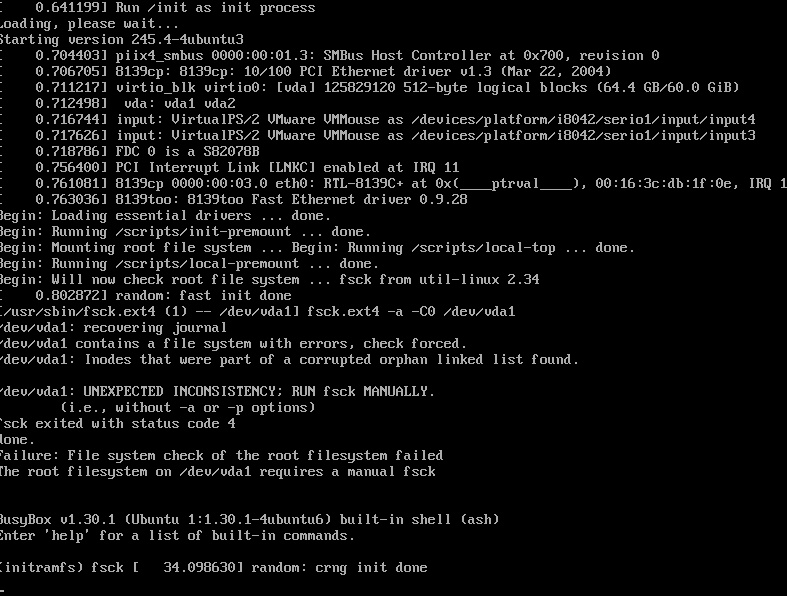
SOLUSI : Linuxmint tidak bisa boot dengan pesan : Enter hele for a list of built-in cond (Initramfs)

Untuk mengatasi ini di linuxmint : Fix initramfs issue in Ubuhttps://support.exabytes.co.id/id/support/solutions/articles/14000138240-muncul-initramfs-fsck-pada-ubuntu-20ntu | Initramfs Error in Kali | Boot drops to an initramfs prompts/BusyBox


https://support.exabytes.co.id/id/support/solutions/articles/14000138240-muncul-initramfs-fsck-pada-ubuntu-20

Muncul initramfs fsck pada Ubuntu 20

Panduan bagaimana mengatasi ketika adanya pesan initramfs fsck setelah melakukan reboot pada Ubuntu 20. Untuk mengatasinya, pastikan anda login ke server anda menggunakan VNC lewat client area.


Gambar lebih detail seperti di bawah ini.


Untuk mengatasi ini, gunakan syntax fsck berikut :


# fsck -y /dev/vda1


Ketika sudah selesai, gunakan exit untuk keluar dari BusyBox.


# exit


Kemudian tidak lama, anda akan masuk ke login Ubuntu 20.


Friday, May 12, 2023

[SOLUSI] This property is part of a link between a Universal Analytics property and a Google Analytics 4 property and can't be deleted.

[SOLUSI] jika ketika ingin menghapus Google Analytic UA. Tetapi tidak bisa terhapus.

dan muncul pesan begini : 
This property is part of a link between a Universal Analytics property and a Google Analytics 4 property and can't be deleted.

Solusinya mudah saja. 

Click Admin. Select your Universal Analytics property. In the Property column, click GA4 Setup Assistant. Next to "Connected property", click Disconnect.


Setelah itu lakukan Trash can